
An AI receptionist is a voice-based administrative system that answers a clinic's calls, follows approved scripts, books or reschedules appointments inside supported practice management software, and hands clinical or unusual requests to a human. It doesn't diagnose, triage, or advise on treatment.
You're midway through a treatment, your receptionist is helping someone at the counter, and the phone starts ringing. The practical question isn't whether AI can hold a conversation. It's whether software can complete the reception task safely without creating more work for your team.
Table of Contents
- The Moment a Phone Rings and Nobody Picks Up
- What an AI Receptionist Actually Is
- Core Capabilities Behind the Voice
- Where the AI Receptionist Must Stop
- How a Real Call Plays Out
- Safeguards Clinics Should Expect
- Why Small Clinics Are Adopting AI Receptionists
The Moment a Phone Rings and Nobody Picks Up
Consider a familiar clinic afternoon. A practitioner is with a patient, someone arriving for their appointment needs help, and a prospective patient calls to ask about availability. Nobody is doing anything wrong, but nobody has a free hand for the phone.
If the caller hangs up, the team may never learn what they needed. If they leave a message, someone still has to listen, check the diary, call back and finish the task. Answering a call and resolving an administrative request are different jobs.
That distinction is the useful starting point for evaluating an AI receptionist. You're not buying a more elaborate voicemail greeting. You're deciding which routine reception tasks software can complete, and which conversations need a person.
Start with the interruption you want to remove
A solo physiotherapist may need coverage only while treating patients. A podiatry clinic may have a capable reception team but struggle with overlapping calls. Another practice may want callers to book after the clinic has closed.
These situations call for different configurations:
- During treatment: Let callers make an administrative request without interrupting the practitioner.
- When reception is busy: Give the front desk support rather than redirecting every conversation.
- Outside opening hours: Capture appointment enquiries while keeping clinical questions outside the automated workflow.
A clinic answering service is worth assessing against that specific gap, not against a broad promise to automate the practice.
Keep responsibility visible
The clinic still decides what appointment types callers can request, what information reception can provide and who receives exceptions. Software shouldn't make those decisions because a caller asks confidently.
Practical rule: Give the system a defined reception job, not an open-ended instruction to help patients.
Before choosing a tool, write down the calls your team is comfortable delegating. Then write down the calls they would always pass to a practitioner or practice manager. That separation gives you a much clearer starting point than a feature list.
What an AI Receptionist Actually Is
A human receptionist listens, identifies why someone is calling, checks the diary and responds in the clinic's tone. They also recognise when they need help. An AI receptionist performs a bounded version of that workflow through software.
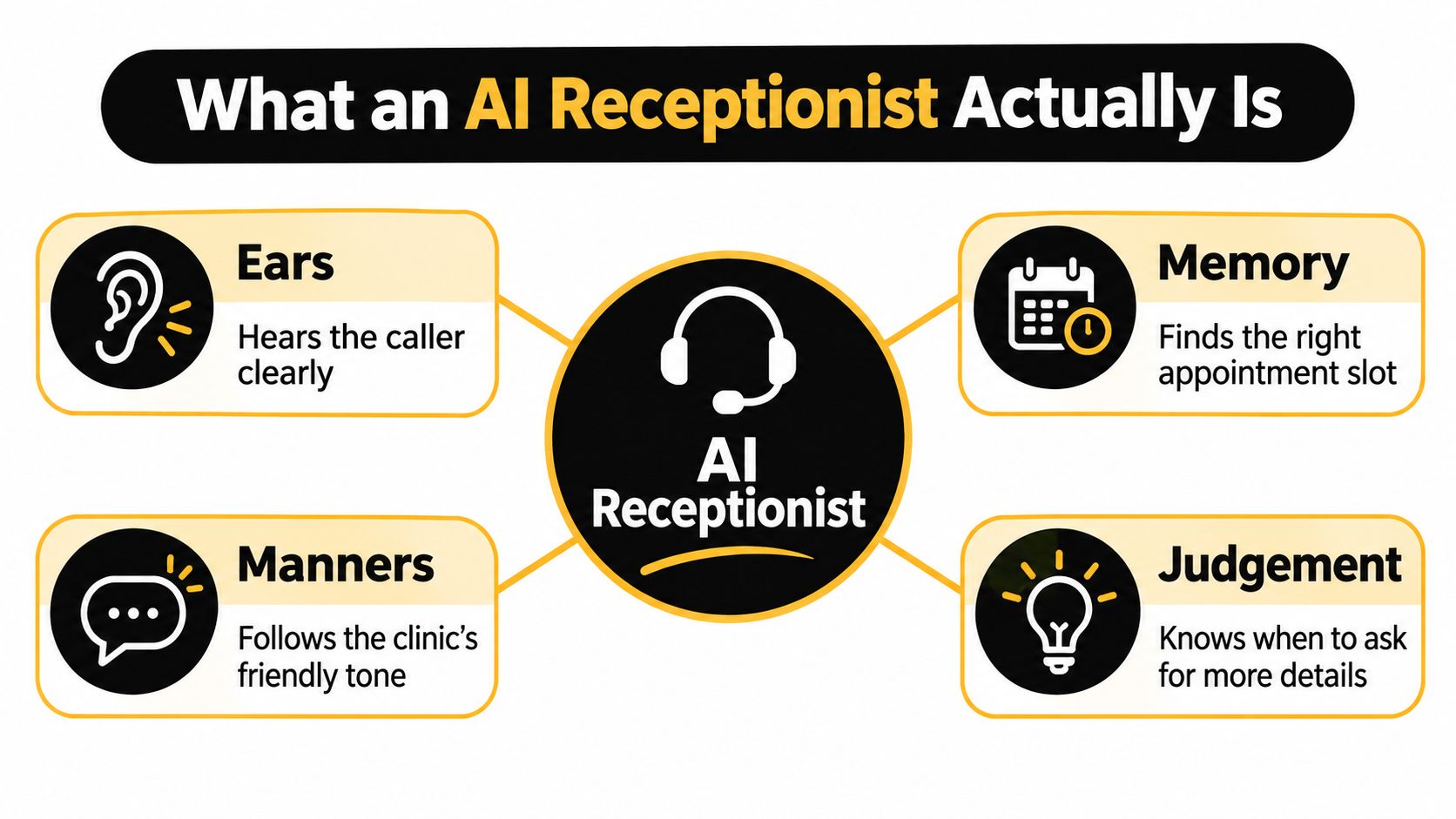
The analogy is useful, provided you don't mistake conversational fluency for professional judgement. The system's “ears” recognise speech, its “memory” accesses permitted information, and its “manners” reflect the clinic's instructions. Its “judgement” should mean recognising uncertainty and asking for clarification or assistance, not assessing a patient's condition.
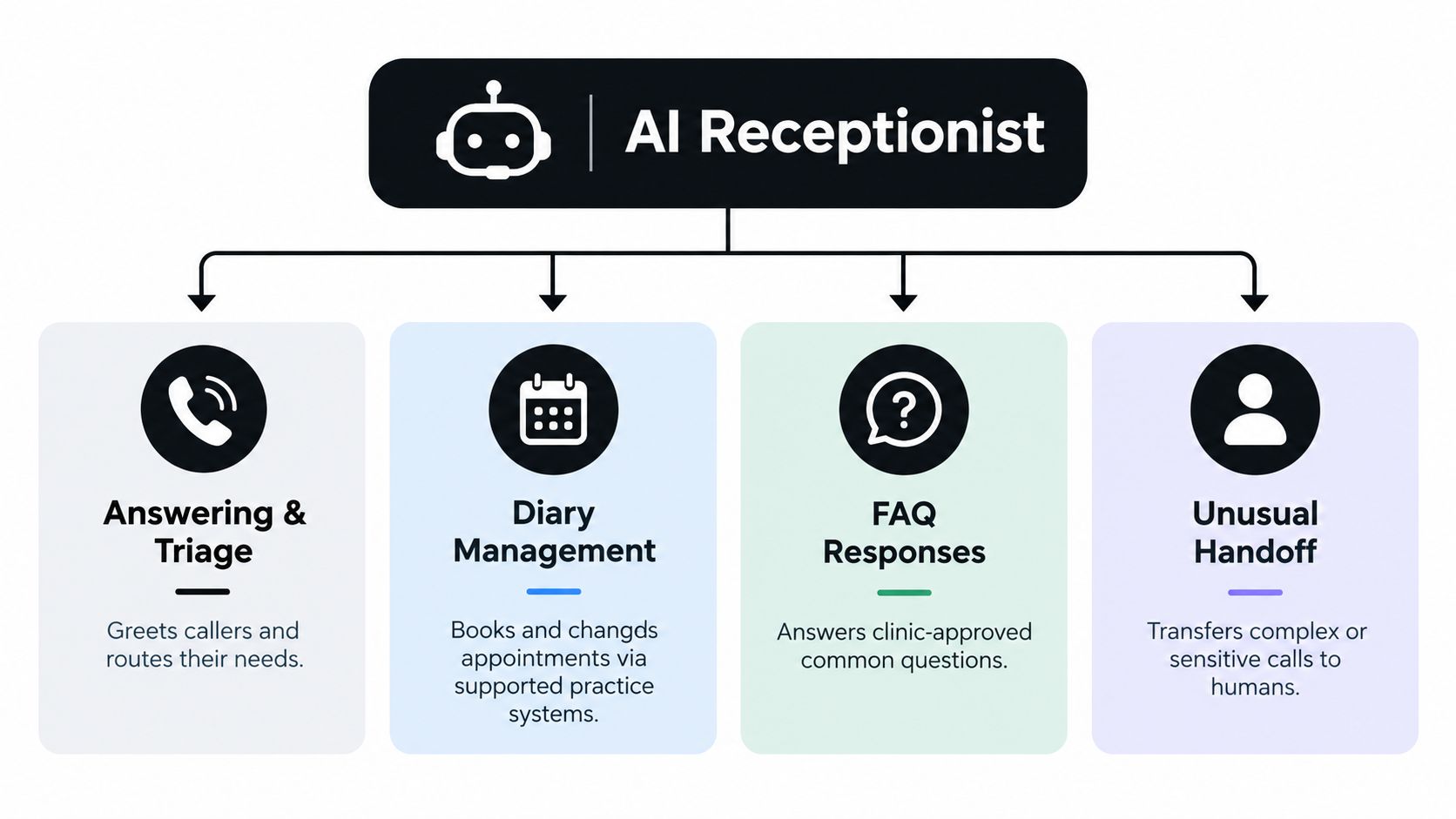
The capability map below illustrates that distinction.
From speech to an administrative action
Suppose a caller wants to move an existing appointment. Speech recognition turns their spoken request into information the system can process. Intent classification identifies rescheduling as the task, rather than treating the conversation as a general question.
The system then follows the permitted workflow. It gathers the necessary details, accesses administrative availability and attempts the requested transaction. If the request falls outside its permissions or remains unclear, it should stop rather than improvise.
That's why an AI receptionist needs more than a pleasant voice. It needs access controls, clinic-specific instructions and a reliable connection to the software where reception work happens.
Similar interfaces, different responsibilities
The distinctions are easiest to see side by side:
| Tool | What defines its role |
|---|---|
| Phone menu | Sends callers through predefined options |
| Text chatbot | Handles a conversation through a written interface |
| AI receptionist | Interprets spoken administrative requests and carries out permitted reception tasks |
| Clinical decision tool | Supports decisions involving a patient's health, which is outside this receptionist role |
These categories can overlap in interface, but they shouldn't blur in responsibility. A voice system isn't automatically a clinical assistant because it operates in a healthcare setting.
For context, a 2024 Australian health-sector analysis reported generative AI adoption in 25% of healthcare organisations, while 66% of Australian chief executives expressed a strong desire to integrate it into operations within three years, according to PwC's analysis of healthcare and AI. Those figures describe broader AI interest, not AI receptionist adoption specifically.
When a colleague asks, “What is an AI receptionist?”, the useful answer is functional: software that carries out authorised reception work by voice. Its remit is administrative access, not patient assessment.
Core Capabilities Behind the Voice
A useful feature list should explain what happens during a call. “Appointment automation” is too broad unless you know whether the tool can read availability, change an existing booking or merely send someone a booking link.
The capabilities below belong within a controlled reception workflow. In this context, call routing is not clinical triage: it means identifying the administrative purpose of a call and sending it to the appropriate destination.
Answering and managing the diary
The greeting should establish the clinic and invite the caller to explain what they need. From there, the system distinguishes an appointment request from a message, a clinic-information question or a request for a person.
For diary work, supported integration matters. A practice using Cliniko, Splose, PracSuite or Nookal should check precisely which transactions the proposed service supports in that system. Reading a calendar isn't the same as safely creating, cancelling or moving an appointment.
A sound booking sequence involves:
- Live lookup: Retrieve available appointments from the practice system rather than a copied schedule.
- Pre-save re-check: Check the chosen slot again immediately before attempting the booking.
- Successful write: Confirm the appointment only after the practice software has saved it.
The re-check matters because someone at the front desk may select the same appointment while the caller is still speaking. If the save fails, the correct response is to offer another option or arrange follow-up, not announce a booking that doesn't exist.
Rescheduling also needs a controlled transaction. Ask how the integration handles a failure partway through a change, so an existing booking isn't left in an uncertain state.
Answering questions and passing work on
Approved FAQs cover reception information such as parking, listed fees, opening hours and what patients should bring. The system should retrieve the clinic's answer, not generate a plausible policy from general knowledge.
Human handoff covers the exceptions: complaints, sensitive matters, unclear requests and conversations the caller wants to have with a person. A useful handoff includes enough context that staff don't have to begin again.
Coverage is another practical choice. When reviewing reception feature options, check whether you can select all calls, overflow or after-hours coverage, and retain your existing number.
Start with the mode that addresses your actual workload. Full coverage isn't automatically better if your reception team only needs help during busy periods.
Where the AI Receptionist Must Stop
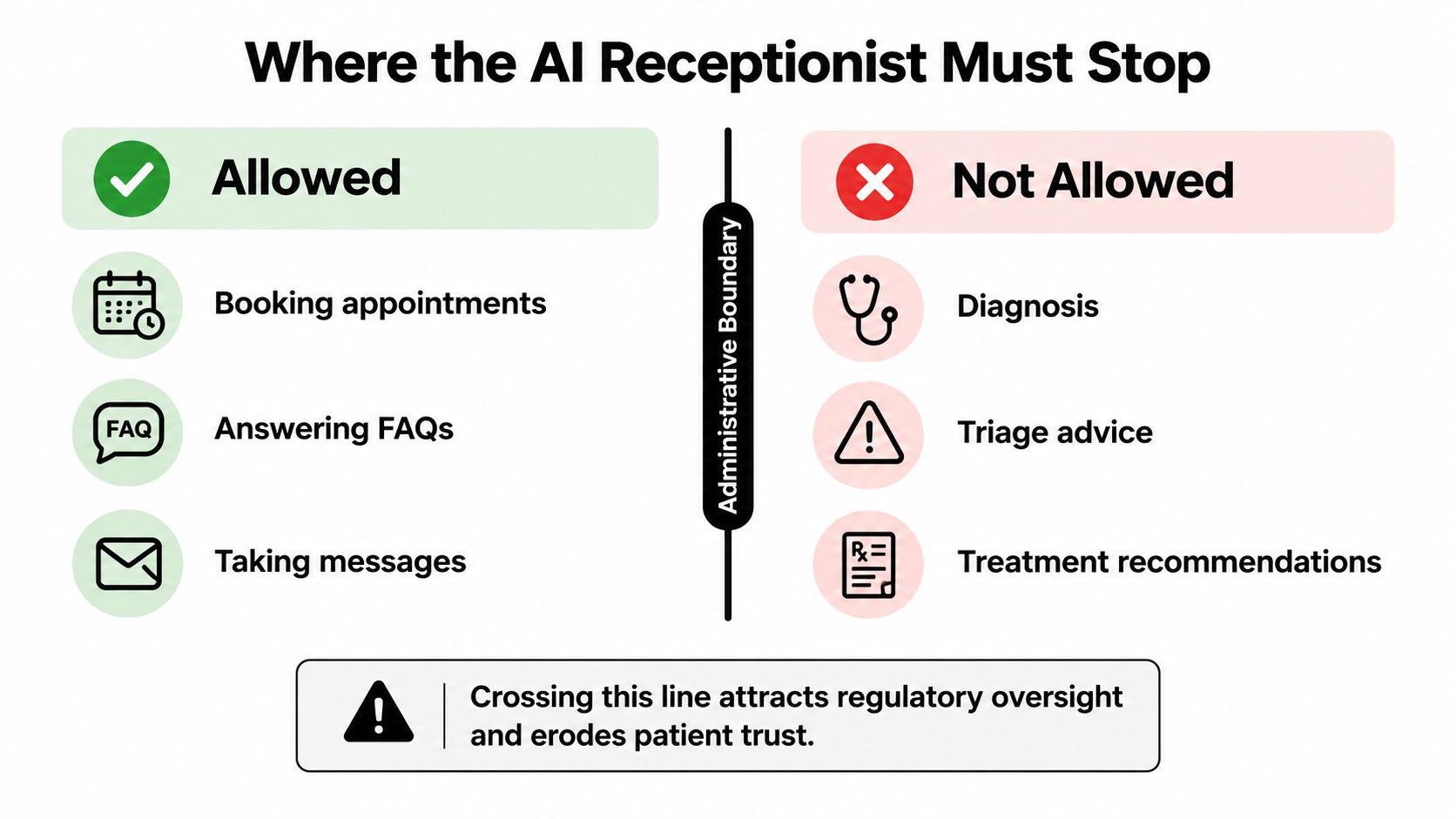
The most important misconception is that an AI receptionist can give medical guidance because it can discuss appointments naturally. It shouldn't interpret symptoms, decide how urgently someone needs care or recommend treatment.
Australia's Department of Health explains that healthcare AI can raise patient-safety and privacy risks, and tools involved in diagnosis, treatment, monitoring, prevention or prediction may fall within Therapeutic Goods Administration oversight, as outlined in its guidance on AI in healthcare. The regulatory position depends on the tool and its intended use, not its receptionist label.
This boundary separates permitted administration from clinical judgement.
Recognise the change in the request
A caller asking for the next available appointment is making an administrative request. A caller asking whether their symptoms can wait until that appointment is asking for an assessment. The topic may sound similar, but the responsibility is different.
The system shouldn't answer the second question by choosing an appointment time. Nor should it reassure the caller, suggest exercises or recommend a particular treatment based on symptoms.
Its permitted actions should be explicit:
- Clarify the limit: Explain politely that it can't assess symptoms or provide medical advice.
- Route appropriately: Follow the clinic's approved human-escalation process.
- Record the request: Create a callback task when a transfer isn't possible, without implying that a callback is clinical assessment.
The clinic should separately define how the system responds to possible emergencies. That response should follow an approved escalation script, not an AI-generated decision about urgency.
Make the boundary testable
An administrative label isn't proof of safe behaviour. During testing, ask symptom questions, request exceptions to clinic rules and pressure the system to answer beyond its scope.
Test uncertainty as well. If a caller gives conflicting information or asks an ambiguous question, the system should seek clarification or hand off rather than guess.
A credible receptionist knows when not to complete the request.
Review whether the call log shows why the system stopped and what happened next. A refusal without a usable handoff can leave staff with unfinished work, while a confident but unauthorised answer creates a different and more serious problem.
How a Real Call Plays Out
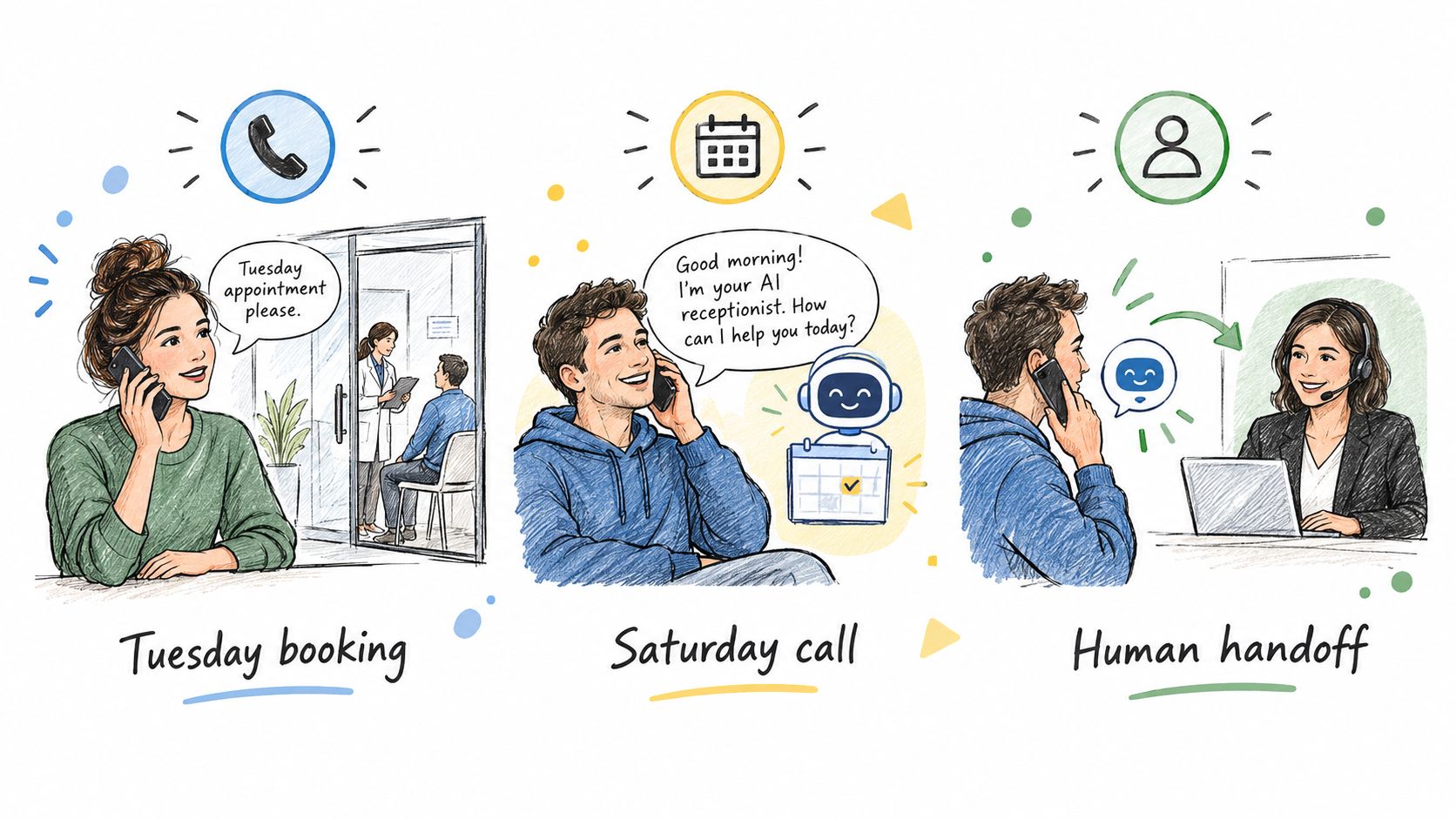
The following are illustrative workflows, not reports of patient outcomes. They show how the same receptionist role changes depending on what the caller asks.
The workflow illustration provides a simple reference for the examples.
A new patient calls during treatment
A prospective patient calls a physiotherapy clinic while the practitioner is occupied. They want a Tuesday appointment and ask about parking.
The receptionist identifies the booking request, gathers the clinic-required details and checks the appropriate appointment category. It uses the approved parking answer, presents available options and follows the booking transaction described above.
If the caller instead asks which treatment they need, the workflow changes. The receptionist can explain the clinic's published appointment categories, but it shouldn't select treatment based on the caller's condition.
A Saturday caller wants to reschedule
An existing patient calls while reception is closed. Before making a change, the system completes the clinic's identity-checking process and locates the relevant booking.
It reads out any applicable rescheduling policy and looks for alternatives that match the permitted appointment type. If a staff member takes the chosen slot before the change is saved, the receptionist should explain that the option is no longer available and continue with another permitted choice.
The practical test is what happens when something goes wrong:
- No suitable availability: Offer the clinic's approved follow-up route rather than inventing a slot.
- Unsuccessful transaction: State that the change hasn't been confirmed.
- Caller requests staff: Use the human-contact process instead of continuing to push automation.
The accompanying video can be viewed alongside these example workflows.
A caller asks about recurring knee pain
A caller describes a recurring knee issue and asks whether they should keep running. There's no diary action that resolves that question safely.
The receptionist explains its limit and follows the configured escalation process. It can capture the caller's request for the human contact, but shouldn't turn the description into a diagnosis or recommendation.
Notice what's absent from this workflow: no clinical interpretation and no booking offered as a substitute for advice. The caller's request determines the path, not the system's ability to keep talking.
Safeguards Clinics Should Expect
A small clinic should evaluate an AI receptionist as a service handling personal information, not merely a phone utility. Ask what information it collects, who can access it and what happens after the conversation ends.
Australian privacy research found that 74% expect disclosure when personal information is shared with a third-party AI provider, 80% want limits preventing unnecessary retention, and 76% want personal information excluded from external AI training without consent, according to the OAIC's research on attitudes to digital technologies. These expectations make transparency part of implementation, not an optional finishing touch.
Turn assurances into operational controls
Before authorising changes to patient records or bookings, establish what identity verification requires. An unclear or failed check should trigger a controlled fallback, not a relaxed standard because the caller sounds familiar.
Approved answers also need an owner. Someone in the clinic should maintain fees, policies and logistics so the system isn't relying on outdated content.
| Control | Question to ask |
|---|---|
| AI disclosure | How does the caller learn that AI is answering? |
| Clinic data separation | How is our information kept separate from other practices? |
| Retention and deletion | What is stored, for how long, and how can it be deleted? |
| External training | Can our callers' information be used to train external models? |
| Human access | What happens when the caller requests a person? |
A provider's privacy information should help you assess these questions. Ask for clarification where published wording doesn't describe the actual workflow.
Give staff a reviewable record
Written summaries should enter a queue with a named owner and an agreed follow-up process. Staff need to distinguish a completed booking from a failed transaction or an unresolved request.
Before going live: Review test-call summaries as carefully as you listen to the voice.
Useful records show the request, verification result, answer provided, transaction outcome and escalation reason. Access to those records should be controlled, and recordings and written summaries should have clearly understood retention settings.
Human fallback must also reflect real staffing. When nobody is available to take a transfer, callers need an accurate explanation of the callback process, not a promise of immediate contact.
Why Small Clinics Are Adopting AI Receptionists
The operational case is straightforward: practitioners and reception staff have work that can't be delegated to a phone system. Routine administration is a more suitable place to consider automation.
Australia's active registered health workforce grew by 37% between 2013 and 2022, while 82% of health-professional occupations were in shortage in 2023, according to the Australian Institute of Health and Welfare's health workforce report. Those figures provide workforce context, not proof that an individual clinic will benefit from an AI receptionist.
Measure completed work, not conversation volume
A useful evaluation compares the clinic's original problem with the result. Did an unanswered enquiry become a saved booking? Did an after-hours request reach the staff queue? Did reception receive a concise summary rather than another incomplete task?
More answered calls aren't enough if staff must repair bookings or chase missing details. Include unsuccessful transactions, inappropriate answers and handoff quality in your review.
Before signing up, check:
- Defined scope: Administrative permissions and prohibited responses are documented.
- Supported system: The integration works with your diary and appointment rules.
- Human fallback: Transfers and callbacks have clear destinations.
- Transparent disclosure: Callers understand who is answering.
- Data controls: Separation, retention, deletion and training use are explained.
- Configured trial: Your team can test realistic calls before deployment.
The best fit is a system your clinic can supervise. It should take responsibility for permitted administrative tasks while leaving practitioners and staff in control of everything outside that remit.
Chimehill offers an administrative-only AI receptionist for allied-health clinics, with round-the-clock answering, booking into supported practice systems, written call logs and human handoff. Visit Chimehill to check compatibility with your clinic's software and trial your own appointment rules, approved answers and escalation settings before going live.