

It's Tuesday evening, the last physio appointment has just finished, and the clinic phone keeps lighting up while the front desk is already closed. One caller wants to book a sore knee they've been putting off for weeks. Another wants to move a Thursday session. A third has just cancelled, which sounds small until you realise that empty slot may stay empty if no one backfills it before morning.
That's the job of a 24/7 answering service for allied health. It's not about pretending every call is an emergency. It's about catching the calls that happen when your team can't, then turning them into something usable, a booking, a callback, a cancellation, or a clean handover.
For Australian clinics, the case for continuous phone coverage isn't abstract. Federal health reporting found that 16.5% of Australians received an after-hours general-practice service in 2021–22, and a 2020 survey cited in that review found 67% had accessed after-hours primary health care at least once in the previous five years (Department of Health review). The point isn't that every caller needs care. The point is that a large slice of health-service demand lands when reception is usually shut.
Table of Contents
- The Tuesday Night Scenario Most Clinics Recognise
- What a 24/7 Answering Service Actually Does
- Deployment Models and Which One Fits Your Clinic
- Pros and Cons for Clinics
- Where the Administrative Line Actually Sits
- Metrics That Actually Tell You If It's Working
- How to Test a Provider Before You Commit
- What a 24/7 Answering Service Is and Isn't
The Tuesday Night Scenario Most Clinics Recognise
The call volume never arrives in tidy office-hour blocks. It lands between appointments, after dinner, and on weekends, when patients finally have time to ring. In allied health, that missed call is usually a missed booking, a missed reschedule, or a cancellation that never gets filled.
A Tuesday-night voicemail is a poor substitute for reception. A new patient with a sore neck may not call back. An existing client who needs to move a session may forget by morning. A same-day cancellation can sit empty even though someone on the waitlist would have taken it.
That is why a 24/7 answering service is an operational tool, not a branding flourish. In Australian business reporting, small-business call-miss estimates vary, but the risk is constant, unanswered calls are where new enquiries, reschedules, and cancellations disappear (Australian call-miss analysis).
Practical rule: if a call could have become a booking, a cancellation recovery, or a callback task, treat it as revenue and access leakage, not “just a missed call”.
After-hours demand is also predictable. Federal health reporting found that 16.5% of Australians received an after-hours general-practice service in 2021–22, and a 2020 survey cited in that review found 67% had accessed after-hours primary health care at least once in the previous five years (Department of Health review). For a clinic, the point is straightforward. The demand is not random. It shows up when reception is usually closed.
What a 24/7 Answering Service Actually Does
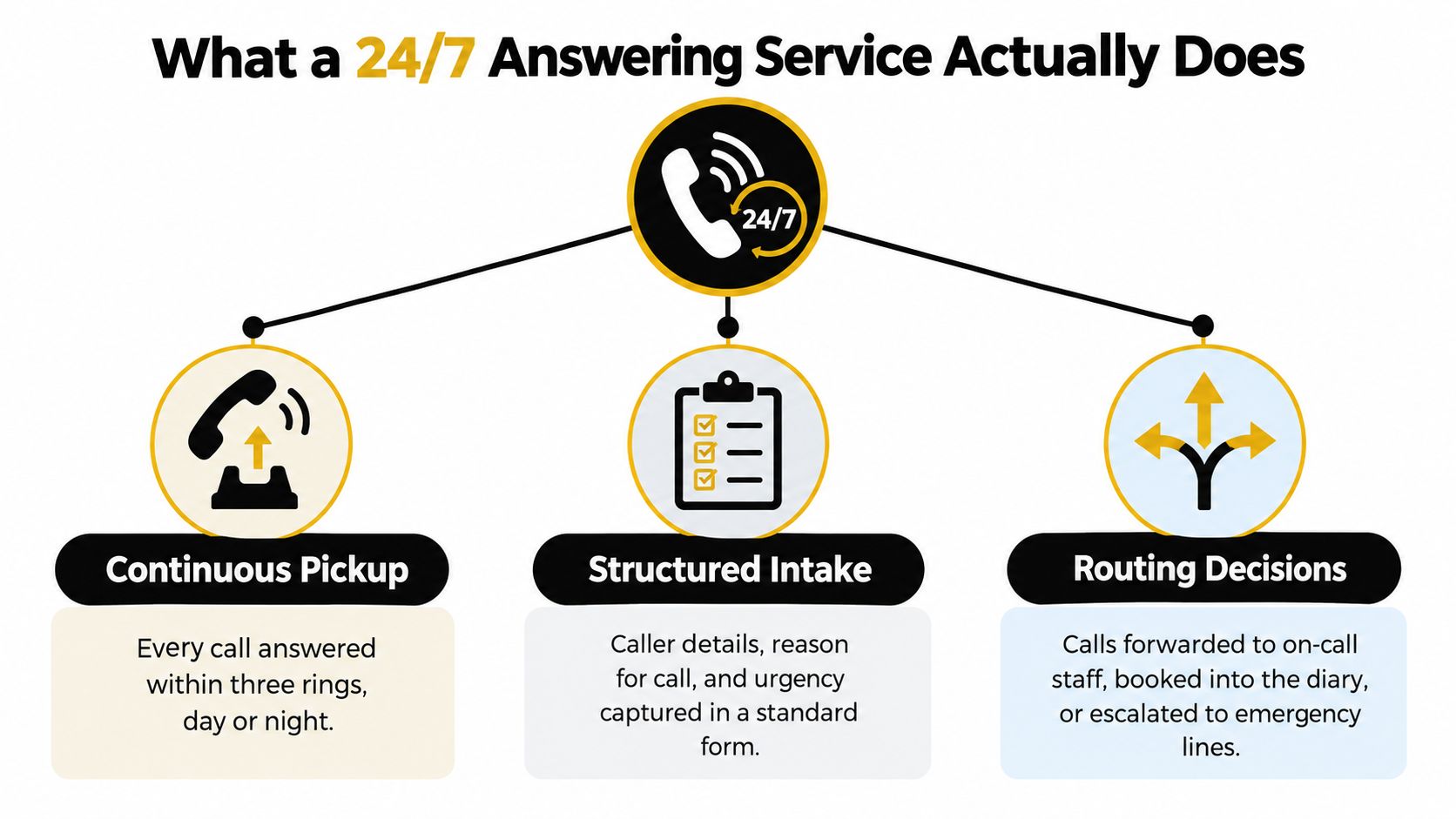
A good 24/7 answering service is a workflow, not a person sitting by a phone. It picks up every time the clinic's line rings, captures the details in a structured way, decides whether the caller can be helped administratively, and then routes the rest to a human contact or a callback task. If it can't safely finish the job, it should stop.
The useful functions are straightforward. It answers. It identifies the caller. It checks live availability. It books, reschedules, or cancels when the practice rules allow it. It creates callback tasks. It logs what happened. That log matters because your staff need to see exactly what was said, what was confirmed, and what still needs follow-up.
The integration layer is where the difference between “looks live” and “is live” shows up. A booking should only be treated as real once the practice-management system writes it successfully. Until then, it's a request, not an appointment. That distinction is where a lot of vendor hype falls apart.
Use the phone workflow as a controlled administrative channel, not an all-purpose front door. If the caller asks about fees, parking, prep instructions, or whether a slot is available, that's reception work. If the caller starts describing symptoms or asking for treatment advice, that's no longer reception work.
For clinics that want to see the use case framing in plain language, this answering service overview is a useful reference point for what the category is meant to do.
Deployment Models and Which One Fits Your Clinic
The wrong setup is usually too broad. Clinics don't need to buy “full coverage” just because they're worried about missed calls. They need to match coverage to their actual call profile, then tighten the routing rules around that profile.
After-Hours Only
This fits solo practitioners and smaller teams with decent daytime reception but a leaky evening and weekend tail. The front desk stays in-house during business hours, and the service catches the calls that would otherwise fall into voicemail once the clinic closes. It's the simplest way to plug the gap without changing how the day runs.
Overflow Routing
This is the right move when the desk gets slammed, sessions run long, or the team keeps missing calls while serving people in person. Overflow routing preserves the live front desk during normal hours, then steps in when the clinic can't get to the phone. For multi-practitioner practices, that usually feels less disruptive than handing everything over.
Full 24/7 Coverage
This suits clinics with sustained after-hours demand, multiple locations, or a front desk that can't stay open late. It gives the most capture, but it also demands the strictest rules. If you choose it, your booking logic, escalation script, and privacy controls need to be disciplined, not vague.
The underlying number stays the same. The clinic keeps its existing phone line and switches the call flow behind it. In practice, that makes the decision a configuration choice, not a telecom project.
| Comparing the Three Deployment Models | Best fit | Calls captured | Calls still missed |
|---|---|---|---|
| After-hours only | Small clinics with strong daytime reception | Evening and weekend calls | Busy daytime calls, unless overflow is also set |
| Overflow routing | Clinics that lose calls during treatment sessions | Calls when the desk is busy | Calls outside the configured overflow window |
| Full 24/7 coverage | Multi-location or high-demand practices | Most inbound calls | Mainly calls that fail policy, identity, or escalation rules |
Pros and Cons for Clinics
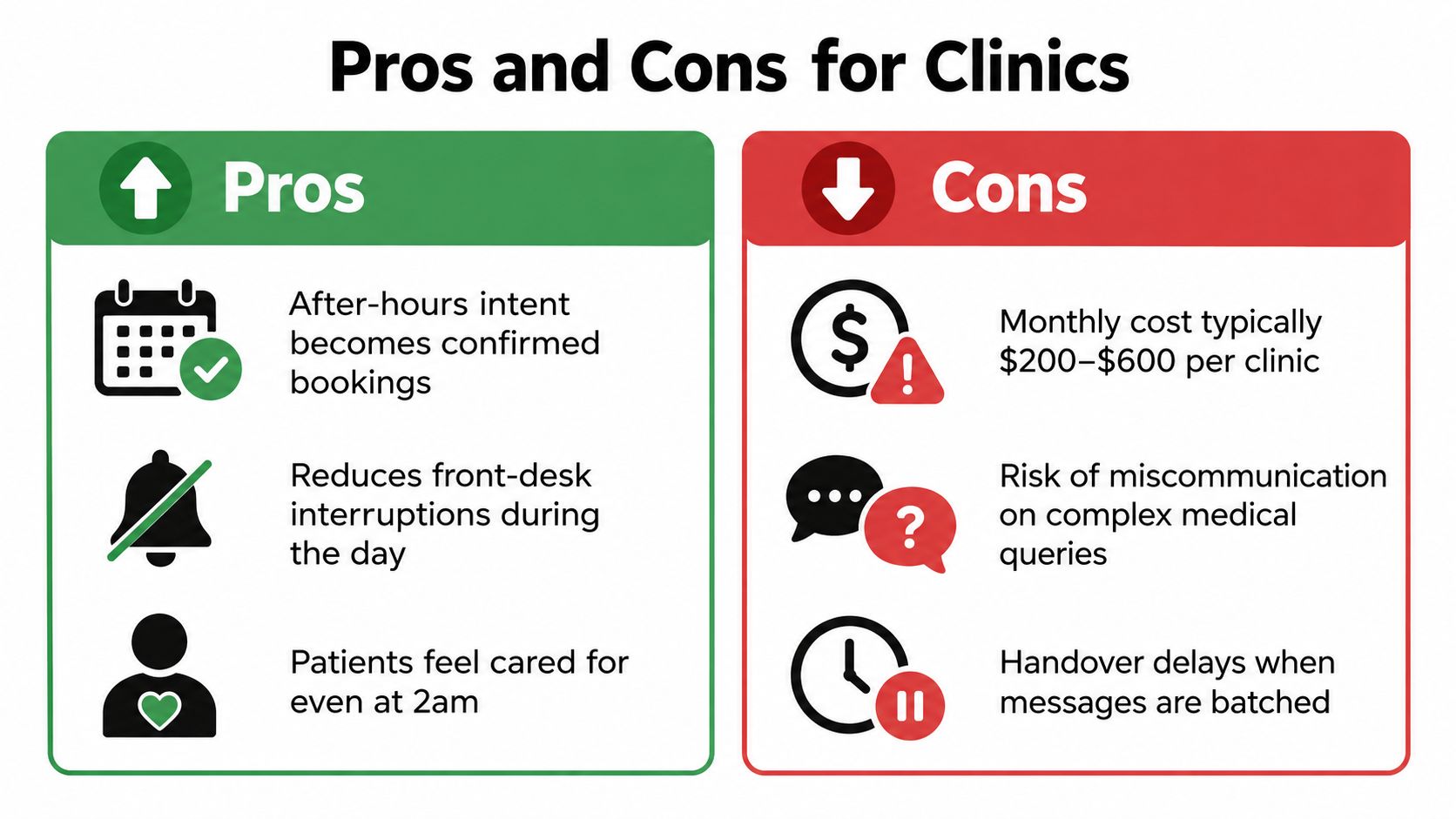
The upside is easy to understand. Calls get answered when your team can't get to them. Bookings that would have died in voicemail become real diary entries. Routine questions stop interrupting therapists in the middle of a consult, which keeps the in-clinic experience cleaner and calmer.
The downside is just as real. If the system hears a name wrong, promises the wrong slot, or sounds nothing like your clinic, patients notice immediately. A confident mistake is worse than a missed voicemail because it creates expectation before the clinic has had a chance to correct it.
That's why I don't buy the lazy "AI is cheaper, therefore it's better" pitch. Cost only matters after you've checked whether the service writes bookings into your software, handles escalation properly, and gives your staff summaries they can work from. A cheap service that creates cleanup is expensive in the only way that matters.
There are also commercial trade-offs. Some providers charge per call, some per minute, and some use monthly bundles. Outbound allowances, trial periods, and no-lock-in arrangements matter more than glossy feature lists because they tell you how painful it is to leave if the service doesn't fit.
Don't pay for a phone system that sounds smart but creates manual rework.
The value lies in the middle ground, administrative coverage that behaves predictably. If the provider can't keep the tone consistent, can't cleanly hand off the edge cases, and can't show you the written trail, the service is doing theatre, not operations.
Where the Administrative Line Actually Sits
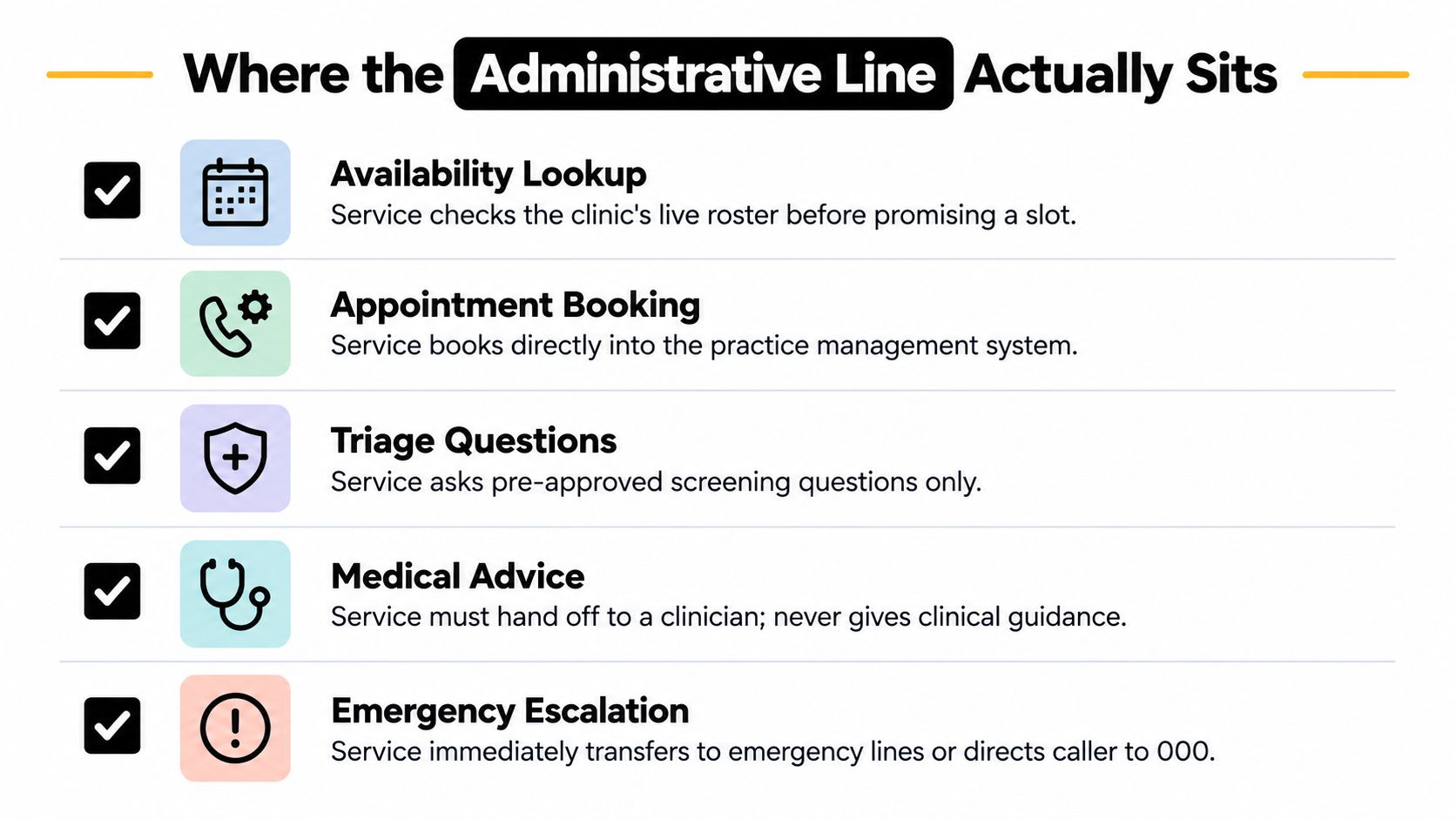
The administrative boundary is narrow, and that's a good thing. A clinic-safe 24/7 answering service should handle availability lookup, appointment creation, rescheduling, cancellations, clinic-approved FAQs, and callback creation. That's the work. Everything else needs a human.
Before any booking changes, identity needs to be checked. If the caller wants to move or cancel an appointment, the system should confirm who they are before touching the record. If the practice software doesn't confirm the write, the caller should not be told they're booked. That's not caution, that's basic control.
The clinical boundary is firm. Diagnosis, triage, symptom interpretation, treatment advice, and urgency judgment sit outside the service. If a caller starts describing pain, concern, or possible deterioration, the system should use a clinic-approved escalation script and move the issue to a person or the emergency pathway.
For Australian health providers, privacy is part of the workflow, not a bolt-on. OAIC guidance says health providers must take reasonable steps to protect personal information from misuse, interference, loss, and unauthorised access, and should address ICT security, access control, third-party providers, data breaches, retention, and destruction or de-identification (OAIC health privacy guidance). Callers also need to be told up front if the call is being recorded or monitored.
That means the call script should be blunt and usable, not fluffy. Say what the service is. Say what it can do. Say when a human takes over. Then keep the audit trail tight.
For clinics running Cliniko, this integration reference is worth checking because the software link is where administrative promises become actual bookings.
Operational rule: if the call changes a patient record, identity comes first. If the call mentions symptoms, a person comes next.
A clean audit trail should show the notice, the identity check, the booking write, the cancellation, the transfer, and the deletion rule. If you can't inspect it, you can't trust it.
Metrics That Actually Tell You If It's Working
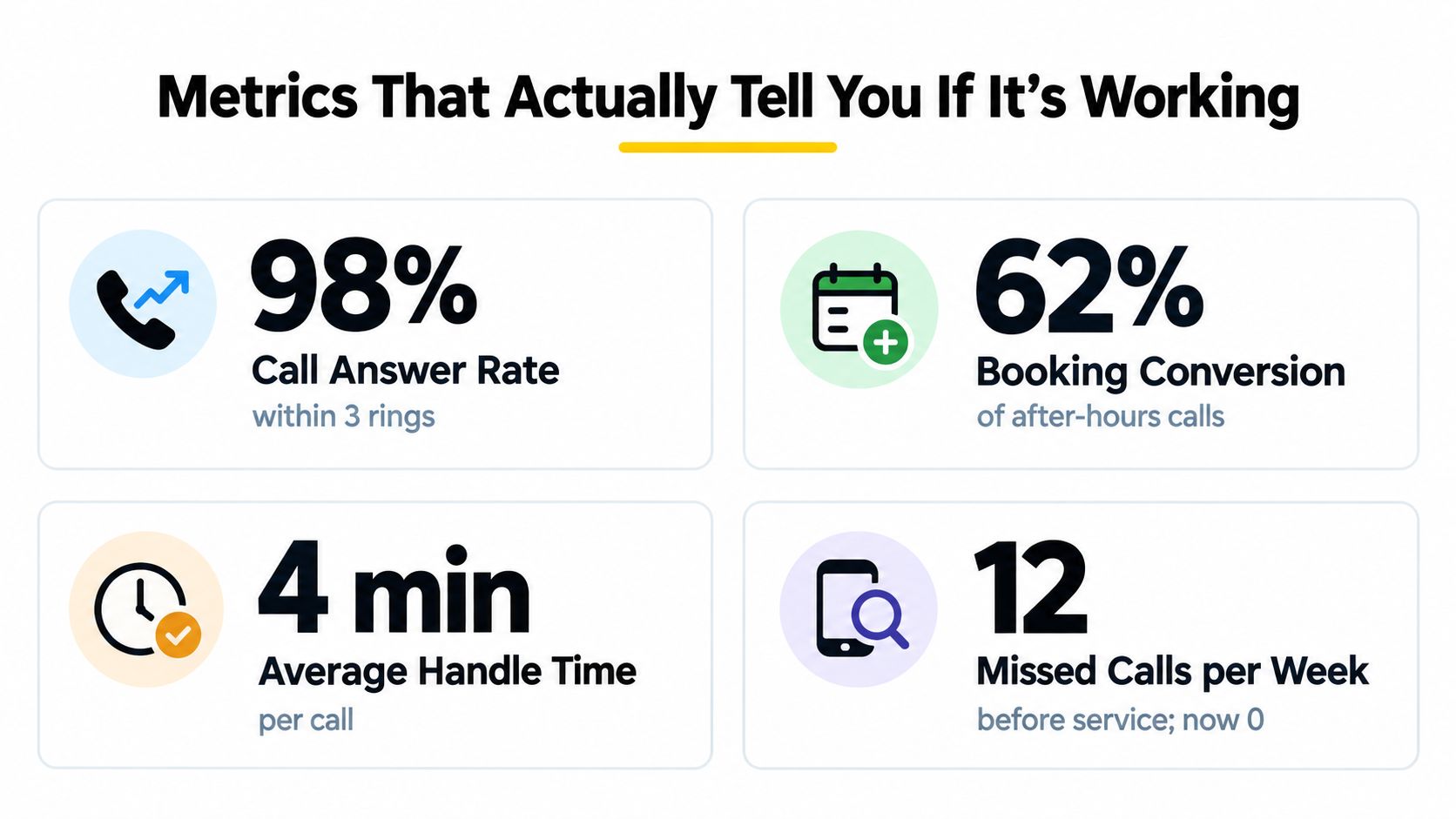
Most vendors love the vanity numbers. I don't care how many calls they say they “handled” if the clinic still had to clean up half the mess the next morning. The metrics that matter are the ones tied to actual clinic work.
Start with answer rate. If calls are coming in after hours and not getting picked up, the setup isn't doing its job. Then look at booking conversion, but only count bookings that were saved in the practice-management system. A verbal promise means nothing if it isn't written into the diary.
The Numbers Worth Checking
- Summary completeness: every call should leave a usable written record. If the front desk can't act on the summary without re-calling the patient, the log is too thin.
- Identity-verification pass rate: you want to know whether the system verifies before changing a record, not after the fact.
- Time to human handoff: when escalation fires, how quickly does a person get it?
Those metrics tell you whether the service is reducing friction or just moving it around.
A few numbers are useful only if the workflow behind them is correct. Average handle time can look tidy while the service fails at booking accuracy. Raw call volume can look impressive while the clinic still misses the calls that matter. Don't let easy-to-report figures distract you from the ones that drive diary fill and admin load.
There's also a geography angle. AIHW reported that in 2023–24, 18.9% of people in metropolitan Primary Health Network areas had an after-hours GP attendance, compared with 9.2% in regional areas (AIHW geography summary). For clinics, that doesn't mean every metro practice should deploy the same way, but it does justify different routing rules by location.
A service that can't show you these numbers isn't ready for a serious clinic. It may answer calls, but it isn't managing them.
How to Test a Provider Before You Commit
Run three calls during the trial, and make them awkward on purpose. First, make a new-patient booking with a slightly unusual name and a less convenient time. Second, make a cancellation request and listen for identity verification and policy wording. Third, disclose a symptom or urgent concern and see whether the system makes up an answer or hands off cleanly.
The summary the next morning should be usable without interpretation. Your front desk should be able to read it, know what happened, and act without ringing the patient back to decode the message. If unresolved items aren't clearly labelled, the service is hiding ambiguity instead of managing it.
A good provider won't flinch at this test. It should want you to probe the edge cases because that's where clinics get burned. If the trial only shows polished routine calls, you still don't know whether the service can operate under pressure.
What a 24/7 Answering Service Is and Isn't
A 24/7 answering service is not a receptionist who never sleeps. It's a safe access and continuity layer that catches administrative demand and routes the rest. That's the strongest frame for allied health, because the service is useful exactly where it stays inside bounds.
Treat it like an operations decision, not a marketing decision. Pick the deployment model that matches your call pattern, run the three-call test, and only keep it if booking confirmations depend on a successful software write and escalation really reaches a person. The clinics that get this right are the ones that value control over hype.
For more on how an AI receptionist fits that boundary in a clinic setting, see this overview of AI receptionist use.
If you want to tighten after-hours capture without turning your phones into a risky triage channel, Chimehill is built for that administrative lane. It answers calls around the clock, books directly into supported practice systems, and keeps a written log your team can review. Visit Chimehill to see how it fits your clinic's call flow.